
一个商品下是否可以有多个独立的顶级留言,每个顶级留言下面都有自己的楼中楼?
答案:是的!完全可以! 每个商品下可以有多个独立的顶级留言,每个顶级留言都是一个独立的楼中楼树。
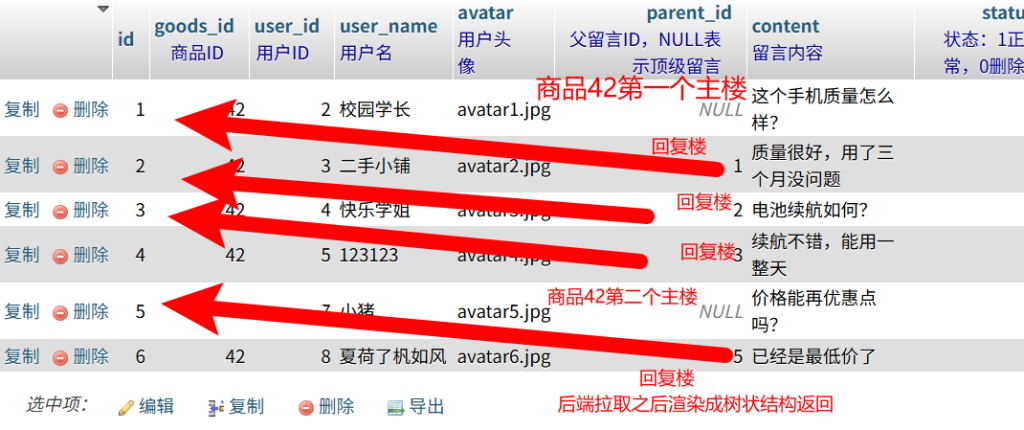
一、数据库示例(多个顶级留言)
-- 商品1下面有3个独立的顶级留言,每个都有自己的楼中楼对话链
INSERT INTO product_comments (id, product_id, user_id, user_name, parent_id, content) VALUES
-- ===== 第1个顶级留言(关于拍照)=====
(1, 1, 1, '用户A', NULL, '这个手机拍照怎么样?'),      -- 顶级留言1
(2, 1, 2, '用户B', 1, '拍照很清晰!'),                 -- 回复留言1
(3, 1, 3, '用户C', 2, '夜间拍照呢?'),                 -- 回复留言2
(4, 1, 4, '用户D', 3, '夜间也不错'),                  -- 回复留言3

-- ===== 第2个顶级留言(关于电池)=====
(5, 1, 5, '用户E', NULL, '电池续航多久?'),            -- 顶级留言2
(6, 1, 6, '用户F', 5, '能用一整天'),                  -- 回复留言5
(7, 1, 7, '用户G', 6, '玩游戏呢?'),                  -- 回复留言6
(8, 1, 8, '用户H', 7, '玩游戏也够用'),                -- 回复留言7

-- ===== 第3个顶级留言(关于价格)=====
(9, 1, 9, '用户I', NULL, '价格太贵了吧?'),            -- 顶级留言3
(10, 1, 10, '用户J', 9, '但性能好呀'),                -- 回复留言9
(11, 1, 11, '用户K', 10, '确实值这个价');              -- 回复留言10
二、构建的树形结构
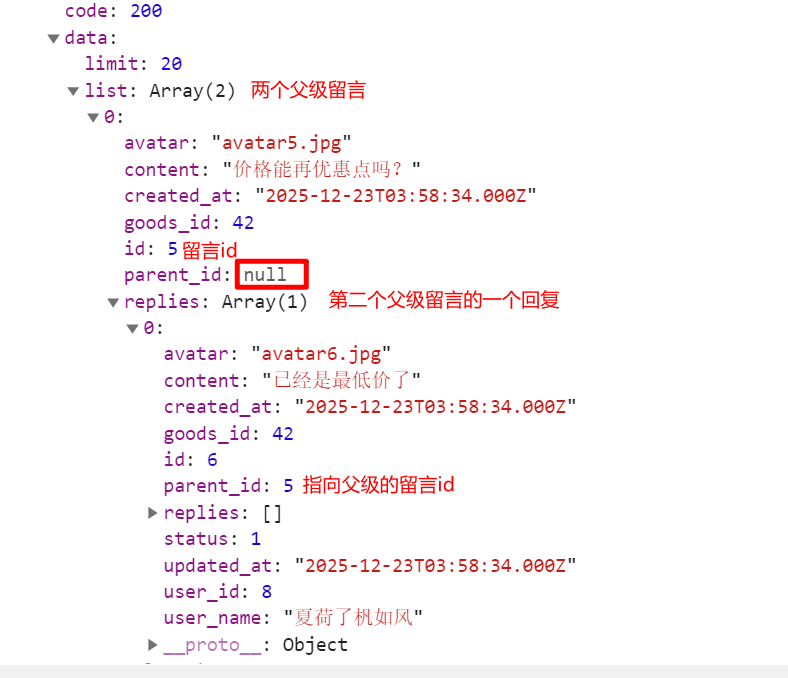
// 查询商品1的所有留言后,会构建出这样的结构:
const commentTree = [
  {
    id: 1,
    content: '这个手机拍照怎么样?',
    parent_id: null,  // 顶级留言
    replies: [        // 第1个楼中楼对话链
      {
        id: 2,
        content: '拍照很清晰!',
        parent_id: 1,
        replies: [
          {
            id: 3,
            content: '夜间拍照呢?',
            parent_id: 2,
            replies: [
              {
                id: 4,
                content: '夜间也不错',
                parent_id: 3,
                replies: []
              }
            ]
          }
        ]
      }
    ]
  },
  {
    id: 5,
    content: '电池续航多久?',
    parent_id: null,  // 顶级留言
    replies: [        // 第2个楼中楼对话链
      {
        id: 6,
        content: '能用一整天',
        parent_id: 5,
        replies: [
          {
            id: 7,
            content: '玩游戏呢?',
            parent_id: 6,
            replies: [
              {
                id: 8,
                content: '玩游戏也够用',
                parent_id: 7,
                replies: []
              }
            ]
          }
        ]
      }
    ]
  },
  {
    id: 9,
    content: '价格太贵了吧?',
    parent_id: null,  // 顶级留言
    replies: [        // 第3个楼中楼对话链
      {
        id: 10,
        content: '但性能好呀',
        parent_id: 9,
        replies: [
          {
            id: 11,
            content: '确实值这个价',
            parent_id: 10,
            replies: []
          }
        ]
      }
    ]
  }
];
三、前端显示效果
=== 商品:iPhone 15 Pro ===

【楼层1】用户A: 这个手机拍照怎么样?
├── 用户B: 拍照很清晰!
│   └── 用户C: 夜间拍照呢?
│       └── 用户D: 夜间也不错

【楼层2】用户E: 电池续航多久?
├── 用户F: 能用一整天
│   └── 用户G: 玩游戏呢?
│       └── 用户H: 玩游戏也够用

【楼层3】用户I: 价格太贵了吧?
├── 用户J: 但性能好呀
│   └── 用户K: 确实值这个价

【楼层4】用户L: 系统流畅吗?
└── 用户M: 非常流畅
    └── 用户N: 打游戏卡吗?
        └── 用户O: 完全不卡
四、关键查询代码
// 获取商品的所有留言(包含多个顶级留言)
static async getProductCommentTree(productId, page = 1, limit = 20) {
  // 1. 分页查询顶级留言
  const topLevelSql = `
    SELECT * FROM product_comments
    WHERE product_id = ?
      AND parent_id IS NULL  -- 只查顶级留言
      AND status = 1
    ORDER BY created_at DESC
    LIMIT ? OFFSET ?
  `;

  const [topLevelComments] = await db.execute(topLevelSql, [productId, limit, offset]);

  // 2. 获取所有相关留言
  const allCommentsSql = `
    SELECT * FROM product_comments
    WHERE product_id = ? AND status = 1
    ORDER BY created_at ASC
  `;
  const [allComments] = await db.execute(allCommentsSql, [productId]);

  // 3. 为每个顶级留言构建自己的楼中楼树
  const commentTree = this.buildCommentTree(topLevelComments, allComments);

  return commentTree;
}
五、创建新顶级留言的示例
用户想发起一个新的话题:
// API调用:创建新的顶级留言
POST /api/comments
{
  "product_id": 1,
  "user_id": 12,
  "user_name": "用户L",
  "parent_id": null,  // 关键:parent_id为null表示是顶级留言
  "content": "系统流畅吗?"
}

// 数据库插入:
// id: 12, product_id: 1, user_id: 12, parent_id: NULL, content: "系统流畅吗?"
然后其他人可以回复这个新话题:
// 回复这个新话题
POST /api/comments
{
  "product_id": 1,
  "user_id": 13,
  "user_name": "用户M",
  "parent_id": 12,  // 回复id=12的留言
  "content": "非常流畅"
}

// 再回复这个回复
POST /api/comments
{
  "product_id": 1,
  "user_id": 14,
  "user_name": "用户N",
  "parent_id": 13,  // 回复id=13的留言
  "content": "打游戏卡吗?"
}
六、总结
一个商品下的留言结构就像这样:
商品1
├── 顶级留言1(楼中楼树1)
│   ├── 回复1-1
│   │   └── 回复1-1-1
│   │       └── 回复1-1-1-1
│   └── 回复1-2
│       └── 回复1-2-1
├── 顶级留言2(楼中楼树2)
│   ├── 回复2-1
│   │   └── 回复2-1-1
│   └── 回复2-2
└── 顶级留言3(楼中楼树3)
    ├── 回复3-1
    │   └── 回复3-1-1
    └── 回复3-2
        └── 回复3-2-1
            └── 回复3-2-1-1
核心特点:
- 一个商品可以有多个顶级留言(每个都是独立的话题)
- 每个顶级留言下面可以有自己的楼中楼对话树
- 楼中楼可以无限层级嵌套
- 每个顶级留言和它的所有回复构成一个独立的树
所以您完全可以实现:在一个商品页面下,显示多个独立的楼中楼对话,每个对话讨论不同的话题。这就是典型的论坛/商品留言板模式!


回复 hello world 取消回复